Kajabi's New Enhanced Checkout: What Changed (and What It Means for Your Sales)
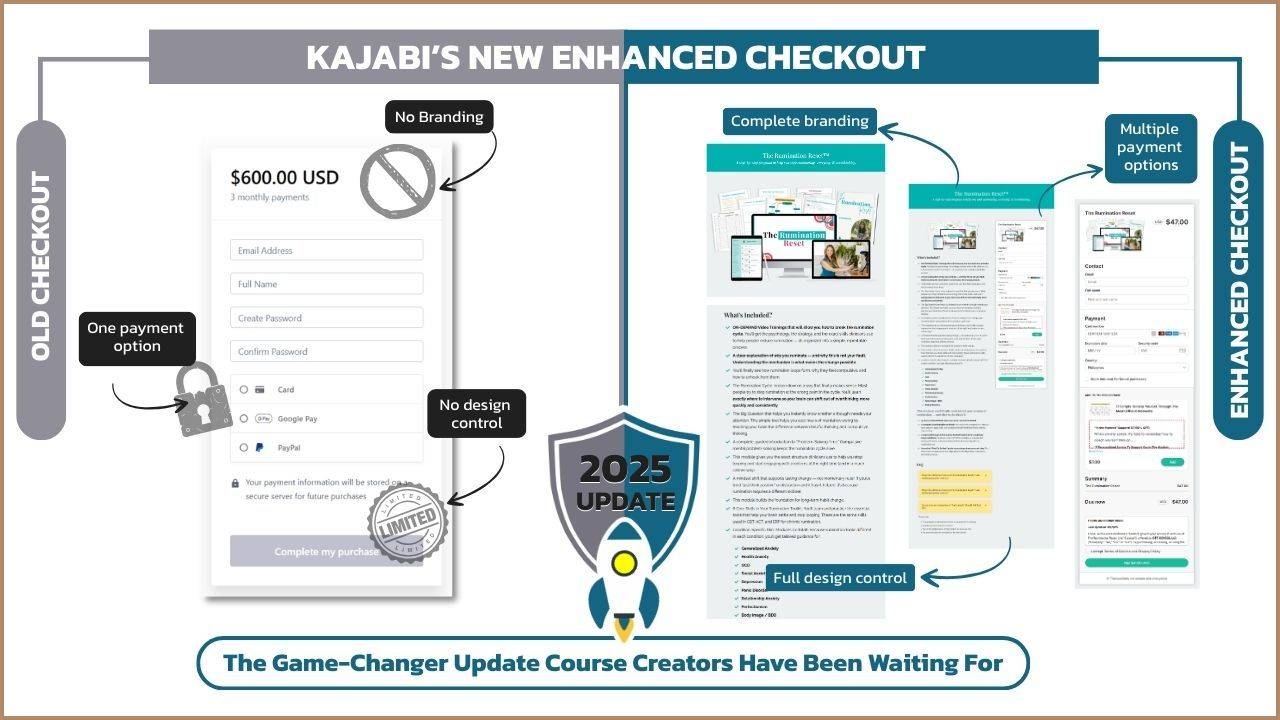
If you've been selling on Kajabi for more than a year, you know the old checkout pages were... limiting.
Want a proper footer? Custom code. Multiple payment options? Custom code. A colored background? You guessed it—custom code.
Unless you knew how to code everything yourself or paid someone hundreds of dollars to do it, you were stuck with a basic checkout that didn't match your brand and probably hurt your conversions.
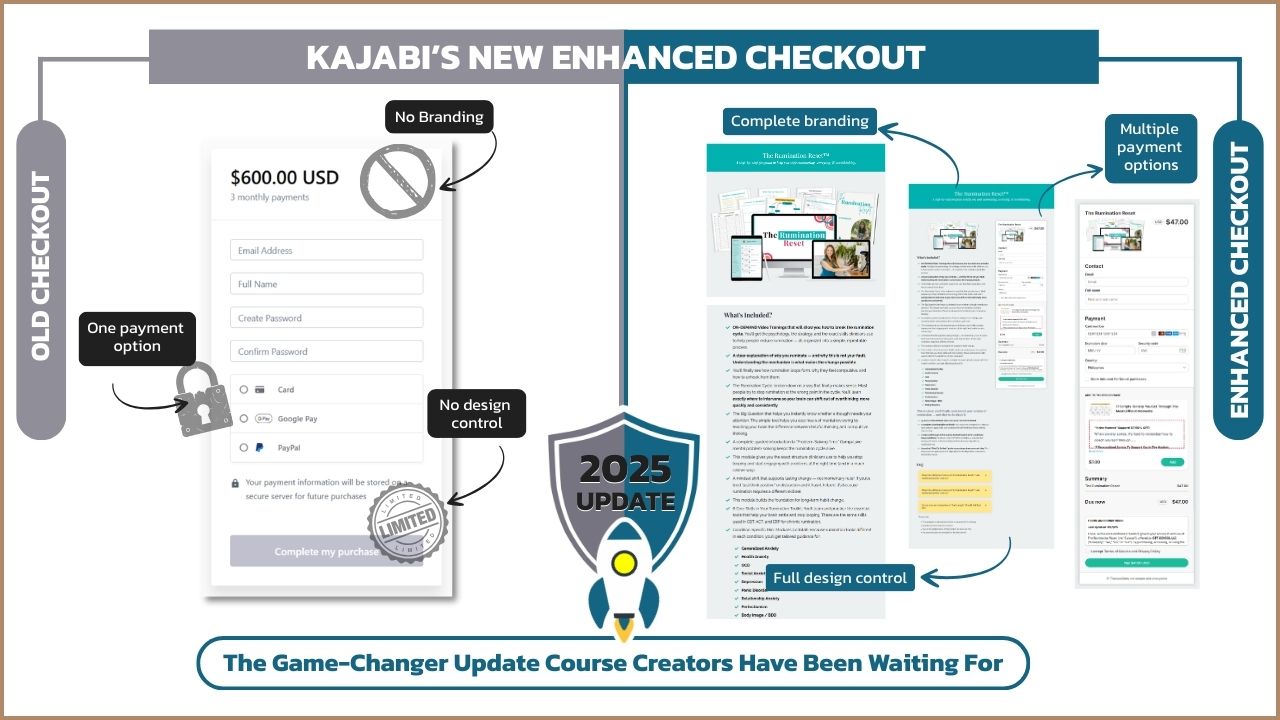
But Kajabi just changed everything with their new enhanced checkout—and after testing it with multiple client accounts, I can tell you this is the biggest checkout upgrade Kajabi has ever released.
In this post, I'm walking you through exactly what's new, what's better, and what limitations you still need to know about before you switch your existing checkouts over.
Kajabi's enhanced checkout is a complete redesign of the checkout page builder that gives you almost the same level of customization you have on landing pages. You can now add headers, footers, custom sections, countdown timers, testimonials, course outlines, and multiple payment options—all without writing a single line of code. Released in late 2025, it replaces the old restrictive checkout system that required custom coding for even basic design changes.
What's New in Kajabi's Enhanced Checkout (The Big Features)
1. Multiple Payment Options (Finally!)
This is the game-changer. The old checkout forced you to custom-code if you wanted to show "pay in full" vs. "payment plan" options side by side.
Now? It's built in.
With the enhanced checkout, your customers can toggle between payment options right on the page:
- Pay in full
- Payment plans (2-pay, 3-pay, custom)
- Subscription options
The button automatically updates to show the correct price and payment structure. No confusion. No extra clicks. Just a clean, clear choice.
Why this matters for conversions: When buyers can see all their options at once, they're more likely to choose one. Before, if someone landed on a "pay in full" checkout and couldn't afford it, they'd just leave. Now they can switch to a payment plan without leaving the page.
2. Full Design Customization (Like a Landing Page)
The new checkout builder looks and works almost exactly like Kajabi's landing page builder.
You can now add:
- Headers and footers (finally!)
- Hero sections with custom images and copy
- Text blocks for benefits, FAQs, or objection handling
- Accordions to hide testimonials or course details
- Course outline blocks that auto-populate from your product
- Countdown timers for urgency
- Social share buttons
- Custom code blocks for advanced design
Before, you had zero control over layout, unless you knew css coding language. Now you can design a checkout that actually matches your brand and supports your sales strategy.
3. Checkout Templates (Export and Import)
This is huge for agencies and service providers (and honestly, anyone managing multiple offers).
You can now:
- Create a custom checkout design
- Export it as a template
- Import it into other offers or accounts
No more duplicating entire offers just to copy a checkout design. No more rebuilding from scratch every time.
For service providers: You can now create branded checkout templates for clients and upload them directly—no need to log into their account and design everything manually.
For course creators: Design your checkout once, save it as a template, and reuse it across all your offers. Update your branding? Update the template and re-import it.
4. Customizable Button Text and Colors
Small detail, big impact.
You can now change:
- Button background color
- Button text (instead of being stuck with "Complete Purchase")
Want your button to say "Join Now" or "Start My Transformation"? You can do that. Want it to match your brand colors exactly? Done.
5. Custom Fields and Optional Fields
You can now add custom fields or optional fields directly in the checkout settings—no need to dig through site settings or use workarounds.
This is great for:
- Collecting additional info (company name, phone number, etc.)
- Segmenting buyers by interest or use case
- Personalizing the post-purchase experience
What Changed in the Checkout Layout (and Why It Matters)
Password Creation Moved to Step 2
In the old checkout, customers created their password on the first page (along with name, email, and payment info).
In the enhanced checkout, you have the option to have the password creation on the second page—after they complete payment.
Why Kajabi did this: Reduces friction on the main checkout page. One less field = one less reason to abandon.
Service Agreement Moved to Settings
Previously, your service agreement checkbox was in the customization area. Now it's in the Settings tab under the checkout editor.
Not a huge change, but if you're looking for it in the old spot, you won't find it.
What You Can Do with the Enhanced Checkout (Real Examples)
Example 1: High-Ticket Offer with Social Proof
- Hero section with benefit-driven headline
- Short text block addressing the main objection
- Accordion with 3–5 testimonials (hidden unless clicked)
- Checkout card with payment options
- Footer with trust badges and policies
Result: Clean, professional, high-converting—without overwhelming the buyer.
Example 2: Course Launch with Urgency
- Countdown timer at the top (sticky or in hero section)
- Course outline block showing what's included
- Checkout card with "pay in full" vs. "3-pay" toggle
- Footer with FAQ accordion
Result: Urgency + clarity = faster buying decisions.
Example 3: Minimal Checkout (No Distractions)
- Simple hero section with one-line benefit
- Checkout card (centered, no extra content)
- Minimal footer with policies only
Result: For audiences that are already sold, this removes every possible distraction and gets them to buy faster.
Kajabi Enhanced Checkout: What's Still Limited
Before you get too excited and rush to update all your checkouts, there are some limitations you need to know about.
1. You Can't Customize Payment Option Labels
The payment options say "Pay in Full," "2 Payments," "3 Payments," etc.—and you can't change the wording.
Why this matters: If you want to say "Best Value" or "Most Popular" next to an option, you can't. If you're selling in a non-English market, you're stuck with English labels.
This is one of the most-requested features, so hopefully Kajabi adds it soon.
2. Order Bumps and Upsells Haven't Been Updated
The cross-selling section (order bumps and upsells) is still the same as before. No design updates, no new functionality.
Kajabi has hinted that updates are on the roadmap, but no timeline yet.
3. Some Blocks Can Hurt Conversions If Overused
Just because you can add accordions, course outlines, testimonials, and countdown timers doesn't mean you should.
The best checkouts are clean and focused. If you add too much, you'll distract buyers and lower conversions.
My rule: Only add content that directly addresses an objection or increases urgency. Everything else is noise.
Should You Switch to the Enhanced Checkout?
Switch if:
- You want design control and branding consistency
- You need multiple payment options without custom code
- You're launching a new offer and want a high-converting checkout
- You're tired of paying developers to customize your checkout
Wait if:
- Your current checkout is converting well and you don't want to risk changing it mid-launch
- You rely heavily on order bumps or upsells (since those features haven't been updated yet)
- You need custom payment option labels for your market or messaging
My recommendation: Test it on a new offer first. Don't switch all your checkouts at once. Run the enhanced checkout on one product, compare conversion rates, and then decide whether to roll it out across your business.
Kajabi Pricing: What You'll Pay to Access the Enhanced Checkout (January 2026)
The enhanced checkout is available on all Kajabi plans!
Here's what Kajabi costs as of January 13, 2026: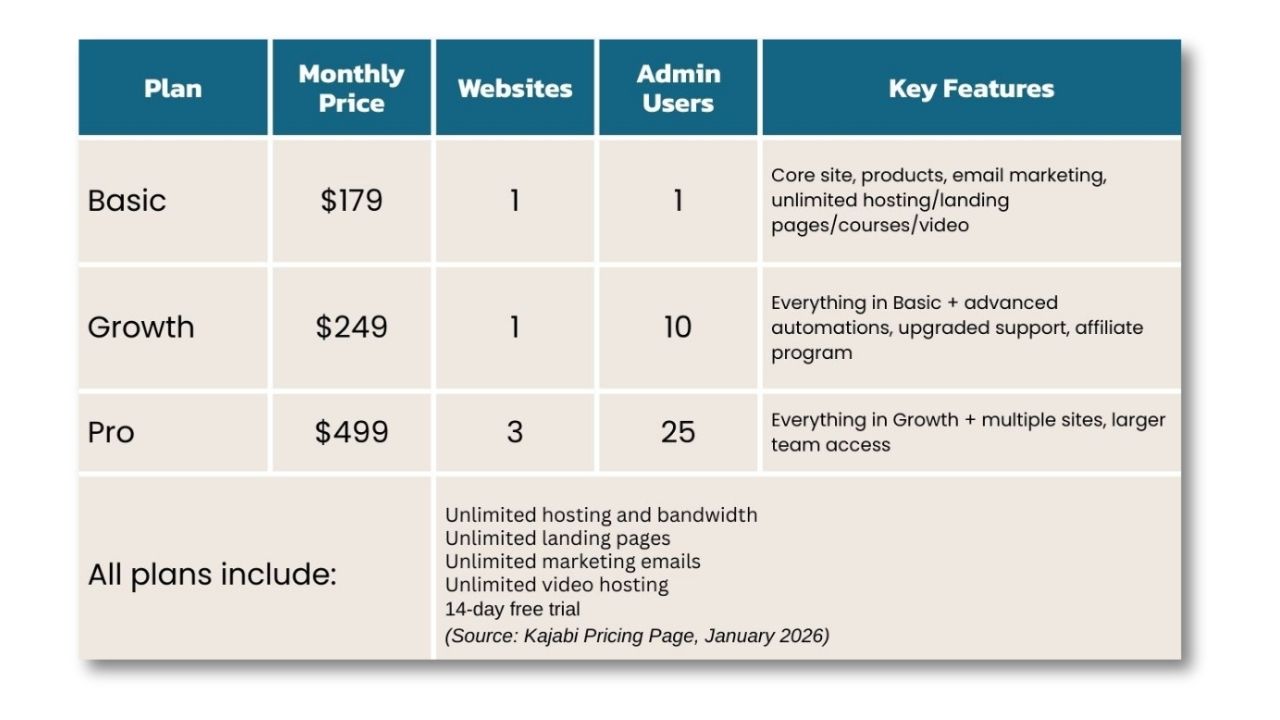
Bottom line: You don't need to upgrade to a higher plan to use the enhanced checkout. Even Kickstarter users get full access.
Ready to Test Kajabi's Enhanced Checkout?
If you're not on Kajabi yet and want to see the enhanced checkout (and everything else Kajabi offers), you can try it free with an extended 45-day trial.
When you sign up through my link, you'll get exclusive bonuses to help you set up your first high-converting checkout.
👉 Get Kajabi's extended 45-day trial + exclusive bonuses
What This Means for Kajabi Users (My Take)
This is the checkout update we've been asking for since 2020.
For years, Kajabi's checkout pages were the weakest part of the platform. They worked, but they didn't convert as well as they could have—and they definitely didn't look as professional as the rest of your site.
The enhanced checkout fixes that.
Now, your checkout can be as polished, branded, and strategic as your landing pages. You can test different layouts, add urgency, highlight social proof, and give buyers the payment flexibility they need—all without hiring a developer.
Is it perfect? No. The payment option labels need to be customizable, and the upsell/order bump section needs an overhaul.
But is it a massive improvement? Absolutely.
If you've been frustrated with Kajabi's checkout limitations, this update is worth testing. And if you're new to Kajabi, this is one more reason the platform is pulling ahead of competitors like Teachable, Thinkific, and Podia.
Common Questions About Kajabi's Enhanced Checkout
Is the enhanced checkout available on all Kajabi plans?
Yes. All plans—including Basic ($179/mo)—have full access to the enhanced checkout as of January 2026.
Can I switch back to the old checkout if I don't like the new one?
As of now, once you enable the enhanced checkout, you can't revert to the old version. That's why I recommend testing on a duplicate offer first.
Do I need to update all my checkouts at once?
No. You can update one offer at a time. Test the new checkout on a single product, measure conversions, and then decide whether to roll it out to other offers.
Can I use custom code in the enhanced checkout?
Yes. There's a custom code block you can add to any section, just like on landing pages. You can also add CSS in the checkout settings under the Design Tools tab.