How to Organize Your Kajabi Landing Pages Without Folders

Ever spent way too long searching through your Kajabi landing pages trying to find that one specific page you need to edit?
Super NOT FUN! We've seen client accounts with over 100 landing pages - talk about a digital mess!
But here's the good news: we've developed a simple yet helpful naming system to keep everything organized and easily searchable.
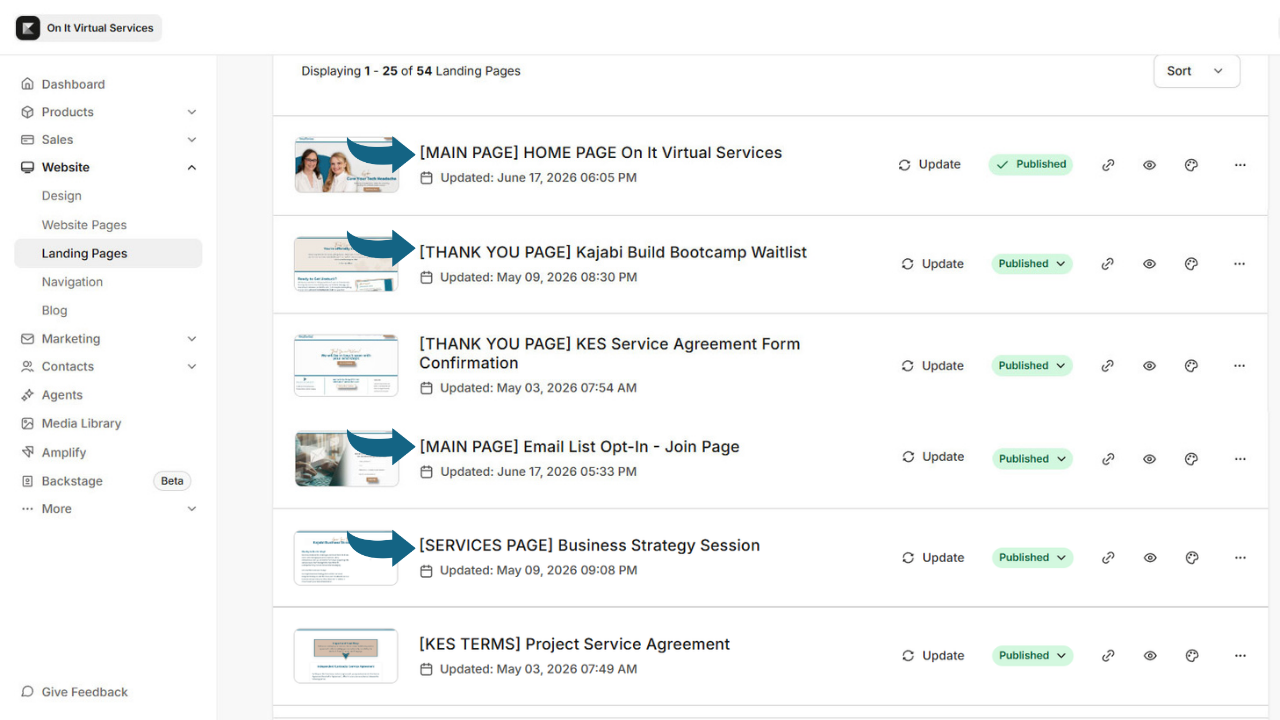
Here's our tried-and-true method for keeping your Kajabi landing pages easy to navigate:
- Use the Internal Name Field: Always give each page a descriptive name that reflects its purpose.
- Group Pages with Brackets: Add a category at the front of the name to visually organize pages by function.
For example:
- [MAIN PAGE] Contact Me
- [MAIN PAGE] Services
Searching “[MAIN PAGE]” will instantly show all your main website pages.
- Create Simple, Consistent Categories: Too many categories defeat the purpose, so stick with a few that make sense.
Common Categories We Use:
- [MAIN PAGE]
- [SALES PAGE]
- [THANK YOU PAGE]
- [FREEBIE OPT-IN]
- [EVENT PAGE]
- [ONE TIME OFFER]
- Add Unique Descriptions: After the category, include specific details about the page’s content.
Example:
- [FREEBIE OPT-IN] 5-Day Challenge
- [SALES PAGE] Spring Launch Offer
- Group Connected Pages: For related pages, use a shared word in the name to easily pull them up in a search.
Example:
- [EVENT PAGE] Webinar Registration
- [EVENT PAGE] Webinar Thank You
Important Note: Be sure to use a more customer-friendly name in the external name field so your viewers don't see the internal name. This keeps things professional on the front end while staying organized on the backend.
Take 15 minutes today to implement this system - you'll thank yourself later when you're not endlessly scrolling through your pages!